Preview every print before it starts

Drop your G-code or 3MF file into a real-time 3D simulator. Catch collisions, verify layers, and check temperatures — before wasting a single gram of filament. 100% free.

Launch the Simulator → Community Mounts
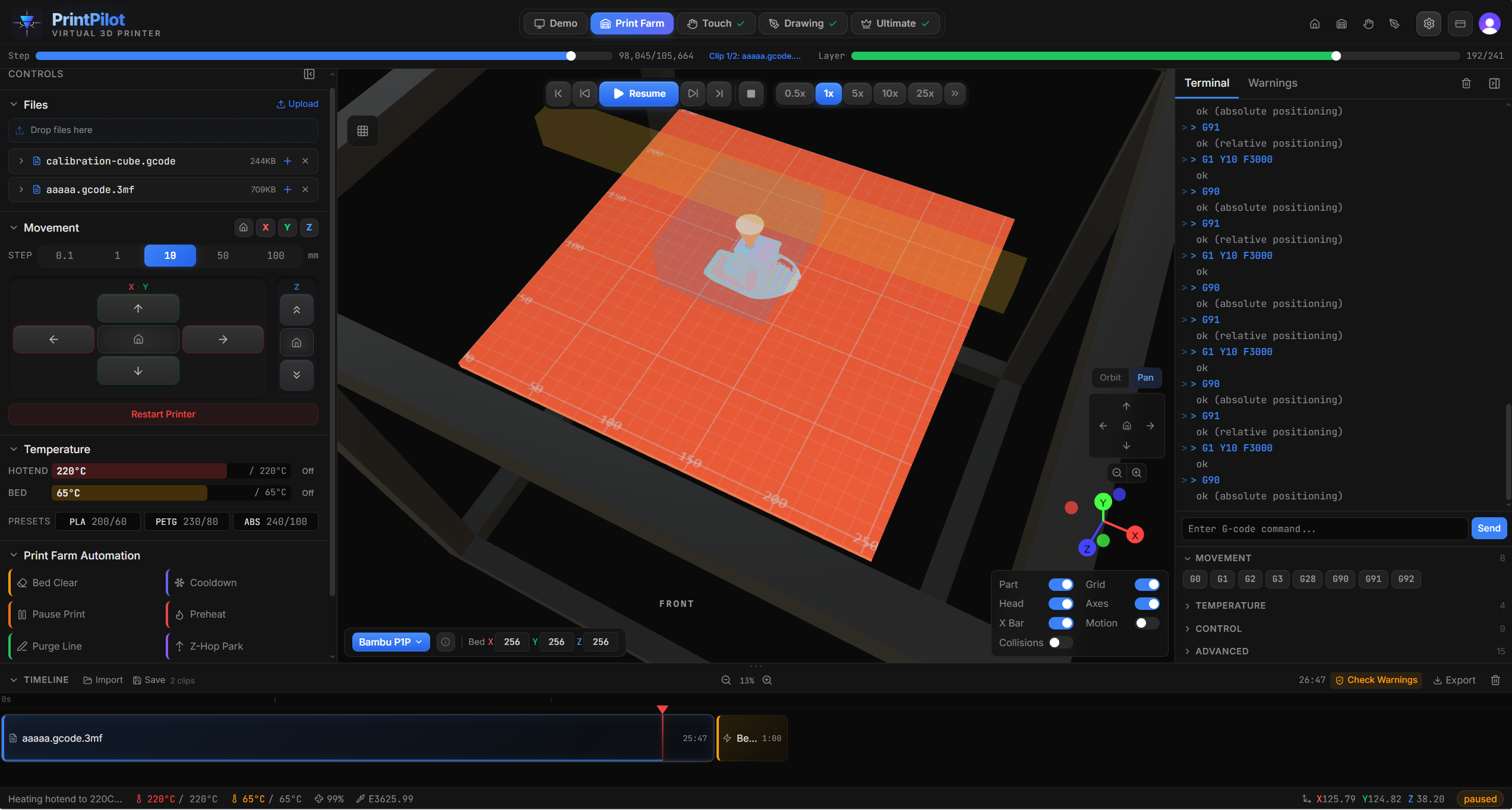
PrintPilot 3D printer simulator with active print, timeline, and live terminal

Real-time 3D simulation with collision detection, layer tracking, and motion profiles

14
Printer Profiles
49
G-code Commands
712
Tests Passing
100%
Client-Side
25
Phone Models

Built for every workflow

One simulator, four specialized modes for different audiences.

Simulator

Catch problems before your printer does.

  • 14 real printer profiles
  • Real-time 3D visualization
  • Printhead & gantry collision detection
  • 3MF auto-detection & G-code support
Launch simulator →

Print Farm

Chain jobs, pause for inserts, swap colors mid-print.

  • Visual timeline editor
  • 6 automation presets
  • Multi-file library
  • Compiled G-code export
Learn more →

Touch Automation

Turn any 3D printer into a phone testing robot.

  • 5 touch presets
  • 25 phone models
  • Stylus calibration & offsets
  • Physical button pressing
Learn more →

Drawing

Your printer is also an artist.

  • 4 drawing tools (pen, line, rectangle, ellipse)
  • Configurable paper sizes
  • Pen up/down simulation
  • G-code toolpath export
Learn more →

Built for engineers who refuse to guess

Every feature designed to save you time, filament, and frustration.

Real-Time 3D Rendering

60fps Three.js viewport with layer-by-layer visualization, smooth motion profiles, and instant scrub-bar seeking.

Collision Detection

Printhead, gantry, bar, and stylus collision warnings catch problems before they damage real hardware.

Trapezoidal Motion Profiles

Acceleration, cruise, and deceleration phases match real firmware behavior for accurate timing.

14 Real Printer Profiles

Bambu P1S, P1P, P2S, X1C, X1E, A1. Prusa MK3S+, MK4, MK4S. Creality K1 Max. Voron 2.4. Ender 3 Pro. Accurate build volumes and travel ranges.

100% Client-Side

All file processing happens in your browser via Web Workers. Your G-code never leaves your device. No account required for the free tier.

3MF + G-code Support

Drop .3mf files from Bambu Studio or PrusaSlicer. Automatic printer detection from slicer metadata and G-code comments.

PrintPilot is free forever

Every mode, every printer, every feature — unlocked for everyone. No signup, no payment, no time limits. Your files never leave your browser.

♥ Support PrintPilot

Hosting, domain, and development time add up. If PrintPilot saved you a failed print, a coffee helps keep it going.

Frequently asked questions

Everything you need to know about PrintPilot.

What is PrintPilot?
PrintPilot is a browser-based 3D printer simulator. You load G-code or 3MF files and watch a virtual printer execute them in real-time 3D. It runs entirely in your browser — no software to install, no files uploaded to servers.
Is PrintPilot really free?
Yes. Every feature is free with no account required. You get 14 printer profiles, 49 G-code commands, collision detection, 3MF support, full 3D visualization, plus Print Farm, Touch, and Drawing modes — all unlocked. PrintPilot runs on voluntary donations through Buy Me a Coffee.
What printers does PrintPilot support?
PrintPilot includes 14 printer profiles: Bambu Lab P1S, P1P, P2S, X1C, X1E, and A1; Prusa MK3S+, MK4, and MK4S; Creality K1 Max; Voron 2.4; Ender 3 Pro; plus Generic Cartesian and Generic CoreXY. Each profile has accurate build volumes, travel ranges, and motion limits.
Do I need to install anything?
No. PrintPilot runs entirely in your web browser. All file parsing and simulation happens client-side using Web Workers. Your files never leave your device.
What G-code commands are supported?
PrintPilot interprets 49 G-code commands including G0/G1 linear moves, G2/G3 arcs, G28 homing, temperature commands (M104, M109, M140, M190), fan control (M106/M107), retraction (G10/G11), and many more. It supports Marlin, RepRap, Klipper, and Griffin G-code flavors.
What is Print Farm mode?
Print Farm mode lets you sequence multiple G-code files on a visual timeline with automation presets between jobs. Insert automatic bed clearing, cooldown, preheat, purge line, pause, or Z-hop park clips. Simulate the full sequence, then export it as a single compiled G-code file ready for your printer.
What is Touch Automation mode?
Touch mode turns your 3D printer into a phone testing robot. Mount a stylus on the printhead and program precise taps, long presses, swipes, multi-taps, and physical button presses on any of 25 supported phone models. The simulator generates G-code with kinematics-aware stylus offset compensation.
What is Drawing mode?
Drawing mode lets you create freehand drawings and geometric shapes (lines, rectangles, ellipses) on a virtual paper sheet, then export the result as pen plotter G-code. It includes configurable paper sizes, pen up/down heights, and draw/travel feedrates.
Is my data private?
Absolutely. All file processing happens in your browser using Web Workers. Your G-code and 3MF files are never uploaded to any server. PrintPilot only communicates with external services for optional sign-in (used only for community features) — your print files stay on your device.

Ready to simulate your next print?

Drop a file in and see for yourself. No signup, no download, no risk.

Launch Free Simulator →